


Table of Content
Migrating from QuickBooks to Dynamics 365 Business Central is a strategic move for businesses looking to scale and streamline their financial operations. QuickBooks, while a popular choice for small and medium-sized enterprises, may become limited functionality as the company grows. Dynamics 365 Business Central, on the other hand, offers a comprehensive and integrated solution that can handle complex financial processes.
Is Your Business Outgrowing QuickBooks?
This isn’t just about switching accounting software; it’s about upgrading your entire business operating system. Let’s explore why a QuickBooks Migration to Business Central is a strategic move for your future, touching on cloud benefits, security, compliance, cost savings, and the incredible power of integration.
According to a recent survey by TechValidate, 47% of small and medium businesses outgrow QuickBooks within 3-5 years due to limitations in reporting, scalability, and multi-user functionality. Additionally, 35% of users reported difficulties integrating QuickBooks with other business applications.
This clearly shows why migration is a real concern for growing businesses.
What is QuickBooks?

QuickBooks is a widely used accounting software developed by Intuit. It's designed to assist businesses with various financial tasks, including bookkeeping, invoicing, expense tracking, and payroll management.
QuickBooks offers both online and desktop versions, catering to the needs of different business sizes. This user-friendly platform simplifies financial operations, allowing users to efficiently manage their income, expenses, and financial reporting.
QuickBooks plays a crucial role in helping businesses maintain accurate financial records, make informed decisions, and ensure compliance with tax regulations.
What is Business Central?
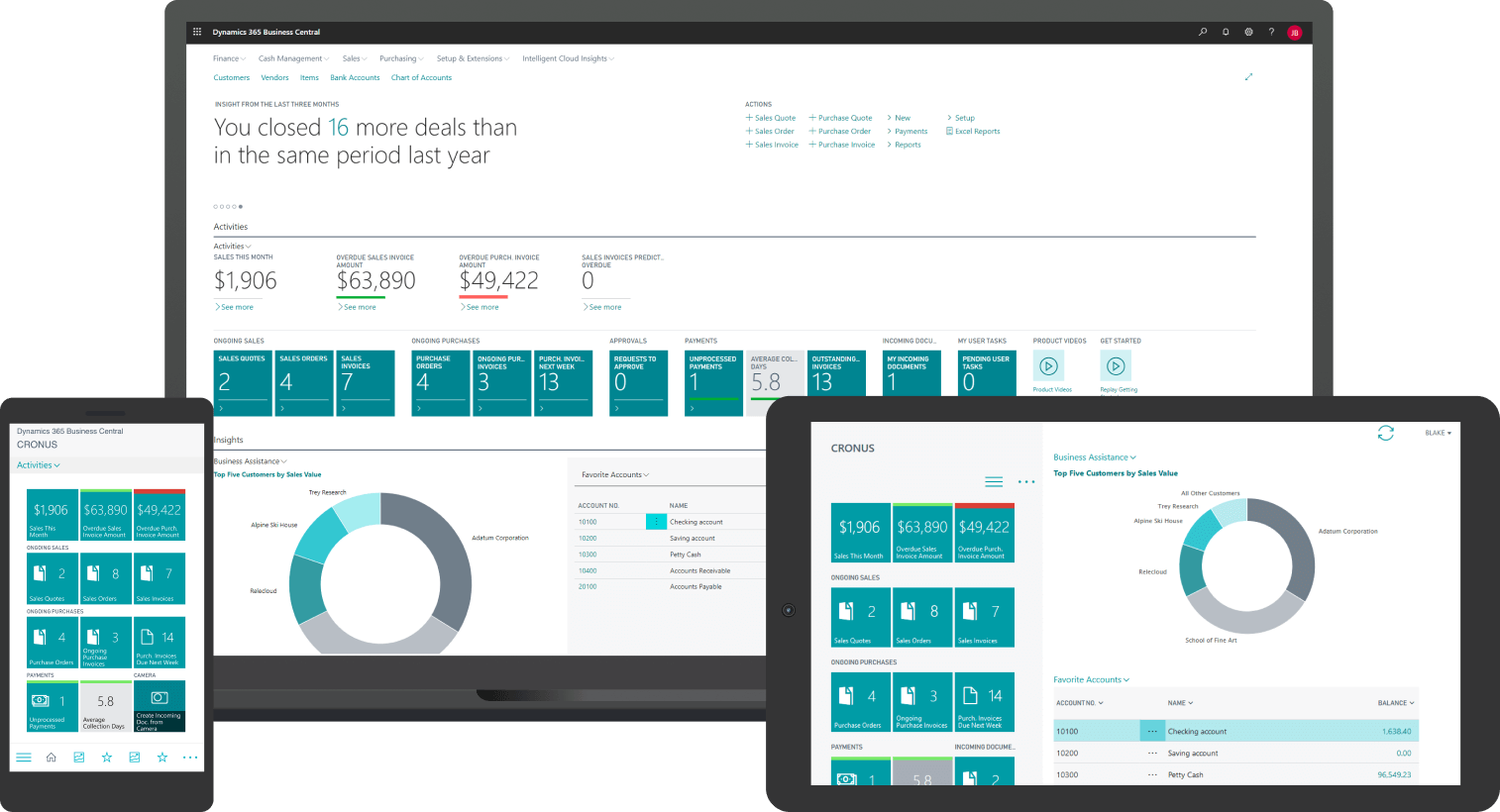
Business Central is an all-in-one, cloud-based enterprise resource planning (ERP) solution offered by Microsoft. Designed for small to medium-sized businesses, it seamlessly integrates financial management, sales, customer service, and operations. Business Central streamlines business processes enhances visibility into operations, and empowers data-driven decision-making.
It offers features such as financial reporting, inventory management, and robust analytics, all accessible from a user-friendly interface. Its scalability ensures that as your business grows, the software can adapt to meet your evolving needs, making it a valuable tool for modern businesses looking to optimize efficiency and productivity.
Related Posts - What is Dynamics 365 Business Central?
Shortcomings Of QuickBooks

- Limited Scalability: QuickBooks may struggle to meet the financial and operational needs of growing businesses, leading to potential inefficiencies.
- Costly Solutions: Expanding QuickBooks with additional modules can be expensive and may not provide a comprehensive solution.
- Migration Consideration: Businesses may need to explore migrating to more robust ERP solutions like Dynamics 365 Business Central to ensure seamless growth and flexibility.
- Limited Reporting Capabilities: Advanced reporting and analytics tools are often lacking, which can hinder data-driven decision-making.
- Integration Hurdles: Integrating QuickBooks with other business systems can be complex and time-consuming.
- Inadequate for Complex Processes: QuickBooks may struggle to cope with the increasing complexity of financial and operational processes in growing companies.
- Limited Records: QuickBooks has limits on the number of records, employees, and transactions it can handle. Once you reach these limits, you have to delete some of QuickBooks' history.
- Limited Security: QuickBooks data is not very secure because it can be modified directly in its tables. This means that someone can change transactions you've uploaded, and there won't be any record of those changes. They can even create transactions that don't balance correctly in your data.
Why do A business should Migrate from QuickBooks to Business Central?
There are several compelling reasons why a business should consider migrating from QuickBooks to Microsoft Dynamics 365 Business Central:
Why migrate from QuickBooks to Business Central?
Switching from QuickBooks to Business Central takes time and resources. Here are some reasons businesses migrate.
Comprehensive platform
While QuickBooks is a platform designed to assist with accounting, Business Central’s platform facilitates accounting, inventory management, supply chain management, sales, and more. Having all of this on one platform makes it much easier to collaborate seamlessly across different areas of the business.
Advanced functionality
QuickBooks’ focus on accounting also means it only offers limited, if any, functionality in other areas.
Business Central has been designed with a much broader scope, offering advanced functionality in areas beyond accounting. It also provides more robust functions within accounting by supporting business transactions, global taxation, and multi-entity accounting.
Data security
QuickBooks lacks stringent security measures, further putting any data at risk. To get around these issues, many businesses use third-party tools.
Business Central benefits from Microsoft’s industry-leading security systems. Because it is based on the cloud, it’s easy to see what changes are made on Business Central and by whom.
Scalability
QuickBooks plan levels are very simple, and there is little freedom to customize users’ individual access.
Business Central gives businesses more control over user access, allowing them to pick and choose which users have what permissions. While this may not be crucial for small businesses, it’s hugely beneficial to large or growing businesses. As the business scales, you can easily adjust how your team uses Business Central.
The Human and Cost Benefits beyond the technical benefits
A QuickBooks to Dynamics 365 Business Central Migration guarantees ROI:
Cost Savings: IT costs will be reduced through cloud subscription, multiple disparate software subscriptions will be eliminated, and free time will be obtained for employees to do higher-value work instead of manual tasks.
Empowered Employees: Give your team the tools needed to work more efficiently, collaborate better, and take initiative. Acting on data takes less time for them than searching for it.
Informed Leadership: Strategic decisions are made from a complete, accurate, and real-time view of your company’s performance. Common mistakes when switching from QuickBooks to Business Central
Several mistakes are common when migrating to Business Central from QuickBooks. While they’re not always preventable, some mistakes are easily avoidable:
Relying on automation tools: While QuickBooks to Business Central migration tools can simplify aspects of the switch, your migration is unlikely to be perfect.
Failure to replicate or eliminate the need for these reports in Business Central can slow your team down and frustrate them.
Ineffective data cleaning: Failure to remove unneeded data can slow down the migration process. Plus, your new system will be cluttered from the start. All this can lead to a substandard system and a waste of resources trying to rectify the problem.
Ignoring training and testing: The period immediately preceding going live is crucial. Without detailed training, team can face issues.
Not using a consultant: Migrating from QuickBooks to Business Central is easiest when you use a consultant. The mistakes you avoid and the seamless transition make the cost of hiring a consultant for Business Central migration well worth it.
QuickBooks Weakness vs Business Central Strengths
| Aspect | QuickBooks Weakness | Business Central Strength |
| Scalability | Limited for larger firms | Highly Scalable |
| Functionality | Basic Features | Comprehensive Capabilities |
| Data security | Vulnerable to tampering | Robust data security |
| Integration | Limited integration | Easy to integrate |
| Real-time-Insights | Limited analytics | Real-time data and insights |
| Deployment | Desktop or online | Cloud-based flexibility |
| Customisation | Limited customisation | Highly customisable |
Related Posts - Business Central vs QuickBooks
Why Choose Dynamics Square for QB to Business Central Migration?
At Dynamics Square, we specialize in Dynamics 365 Business Central seamless migrations. As a certified Microsoft Dynamics 365 partner with deep expertise & certified professionals, we combine technical expertise with a strategic approach to ensure a smooth, error-free migration.
We don’t just implement systems, we empower your business with scalable, customized solutions, robust data security, and actionable insights to drive growth.

Being a reputed and recognized partner for Dynamics 365 Business Central, Dynamics Square possesses a wealth of experience in handling earlier iterations of Dynamics NAV. Our skilled Dynamics 365 consultants are here to guide you in harnessing the capabilities of Microsoft Dynamics 365 Business Central, all while streamlining your business processes for outstanding outcomes.
- Certified Microsoft Dynamics 365 Partner
- 100+ Microsoft Certified Professionals having more than 17 years of experience.
- 99% customer references and retention rate across Australia.
- We are not just a system implementation partner but a strategic IT partner to the customers.
- We believe in a zero-defect policy, which means zero-time over-run and a bug-free implementation process within your budget frame.
Related Posts - Accounting Software for Small Business
Conclusion
In conclusion, we can say that QuickBooks to Dynamics 365 Business Central migration represents a strategic decision that can significantly elevate your business operations. This transition offers a broader spectrum of functionalities, scalability, and integration capabilities, positioning your organization for growth and efficiency. While there may be a learning curve, the long-term advantages, such as advanced financial capabilities and customization options, make this migration a strategic investment in your company's future success. It's a transformative journey towards achieving excellence in financial management and operational efficiency.
Are you now aiming to find out how Dynamics 365 Business Central would look for your business success? Feel free to contact us for a tailor-made Business Central ERP demo
FAQ's QuickBooks to Business Central Migration
1. Why should a business consider switching from QuickBooks to Dynamics 365 Business Central?
QuickBooks is a robust accounting tool, but Dynamics 365 Business Central offers broader functionality, scalability, and integration capabilities to streamline your entire business operations.
2. What is the process of migrating my data from QuickBooks to Dynamics 365 Business Central?
Data migration typically involves exporting data from QuickBooks, transforming it to align with Dynamics 365 Business Central's format, and then importing it into the new system.
3. Can we still use my existing QuickBooks data in Dynamics 365 Business Central?
Yes, you can transfer your historical data to Dynamics 365 Business Central, allowing you to maintain continuity in financial records and reporting.
4. Will we need to retrain our staff when transitioning to Dynamics 365 Business Central?
While there will be a learning curve, Dynamics 365 Business Central is user-friendly and offers training resources to help your team adapt to the new system efficiently.
5. List down the key benefits of moving to Business Central?
- Lower IT and maintenance costs
- AI-driven automation advantage
- Anytime, anywhere cloud access
- Strong security and compliance standards
6. Can we customize Dynamics 365 Business Central to suit my specific business needs?
Yes, Dynamics 365 Business Central is highly customizable, allowing you to adapt the system to your unique business processes and requirements.
7. What is the cost difference between QuickBooks and Dynamics 365 Business Central?
The cost varies depending on factors such as the number of users, the scope of features, and customization. Dynamics 365 Business Central typically represents a higher initial investment but offers more extensive capabilities.
8. Is it possible to retain our QuickBooks Data and run both systems in parallel during the transition period?
Running both systems in parallel is possible during the transition, allowing you to compare data and ensure a smooth migration before fully transitioning to Dynamics 365 Business Central.


Witness a scalable transformation
Experience real-time synchronisation and flexibility with a consistent view across your business.
Disclaimer– “All data and information provided on this blog is for informational purposes only. Dynamics Square / MPG Business Information Systems Pvt. Ltd. makes no representations as to accuracy, completeness, currentness, suitability, or validity of any information on this site and will not be liable for any errors, omissions, or delays in this information or any losses, injuries, or damages arising from its display or use.”


