


Table of Content
The data-driven economy of today forces Australian small and medium-sized enterprises (SMEs) to improve their decision-making speed and quality while making smarter choices. Companies across all industries from manufacturing to professional services and eCommerce generate huge amounts of data each day but face difficulties because they need to change that data into useful business insights.
Power BI has become a transformative solution for this purpose. The advanced analytics of Power BI together with its cost-effective pricing and scalability options enable Australian SMEs to compete with larger firms while staying within their budget constraints and without needing enterprise-level resources.
The blog examines how Power BI changes Australia’s SME landscape through its affordable pricing model, flexible licensing system and its new AI capabilities which are now part of the Power BI.
The Rise of Data-Driven SMEs in Australia
Australian SMEs function as the essential component that sustains the entire national economy through their vital contribution to both job creation and innovative development. However, many SMEs still rely on spreadsheets, manual reporting, and disconnected systems to manage operations.
Organizations encounter common difficulties because of this situation which creates these main problems:
- Departments create data silos which separate their information into different storage locations
- The reporting process requires excessive time to complete
- The organization lacks real-time data which creates operational difficulties
- Organizations make incorrect decisions because they use outdated information
According to industry insights, many businesses struggle because their data is scattered across multiple systems, making it difficult to gain a unified view of operations.
SMEs need to implement contemporary analytics solutions which provide:
- Easy usage
- Affordable pricing
- Business expansion requires increasing system capacity
This is exactly where Power BI fits in.
Business Analysis & Data Reporting challenges: Need for Power BI
Difficulty turning raw data into clear insights
Limited visibility across departments
Time-consuming manual reporting
Lack of real-time analytics for decision-making
Complex datasets that need visual simplification
Inability to share dashboards easily across teams
What Is Power BI?
Microsoft Power BI serves as a business analytics solution which enables users to transform their data into practical business intelligence. Power BI provides all users from business personnel to report makers and system developers with complete data visualization tools which enable them to connect and share information throughout their business activities.
Power BI offers its dashboard function to business professionals who possess various data expertise levels through its capability to display and report data using multiple visualization methods which include graphs, maps, and scatter plots. Power BI's "AI Insights" functionality uses artificial intelligence to discover data insights through its analysis of data set contents.
In Simple Terms:
Power BI serves as an analytics tool which enables users to produce reports.
Dynamics 365 functions as a combined CRM and ERP solution.
Power BI enables users to create visualizations and conduct analyses through their access to Dynamics 365 data.
The product has multiple versions available for users to choose from but people most frequently compare these two versions.
- Power BI (Free) – The software provides individual analysts with a solution designed for their specific work needs.
- Power BI Pro – The software provides enterprises with necessary tools for team collaboration and secure data sharing.
Major Reasons Why Power BI for SMEs in Australia
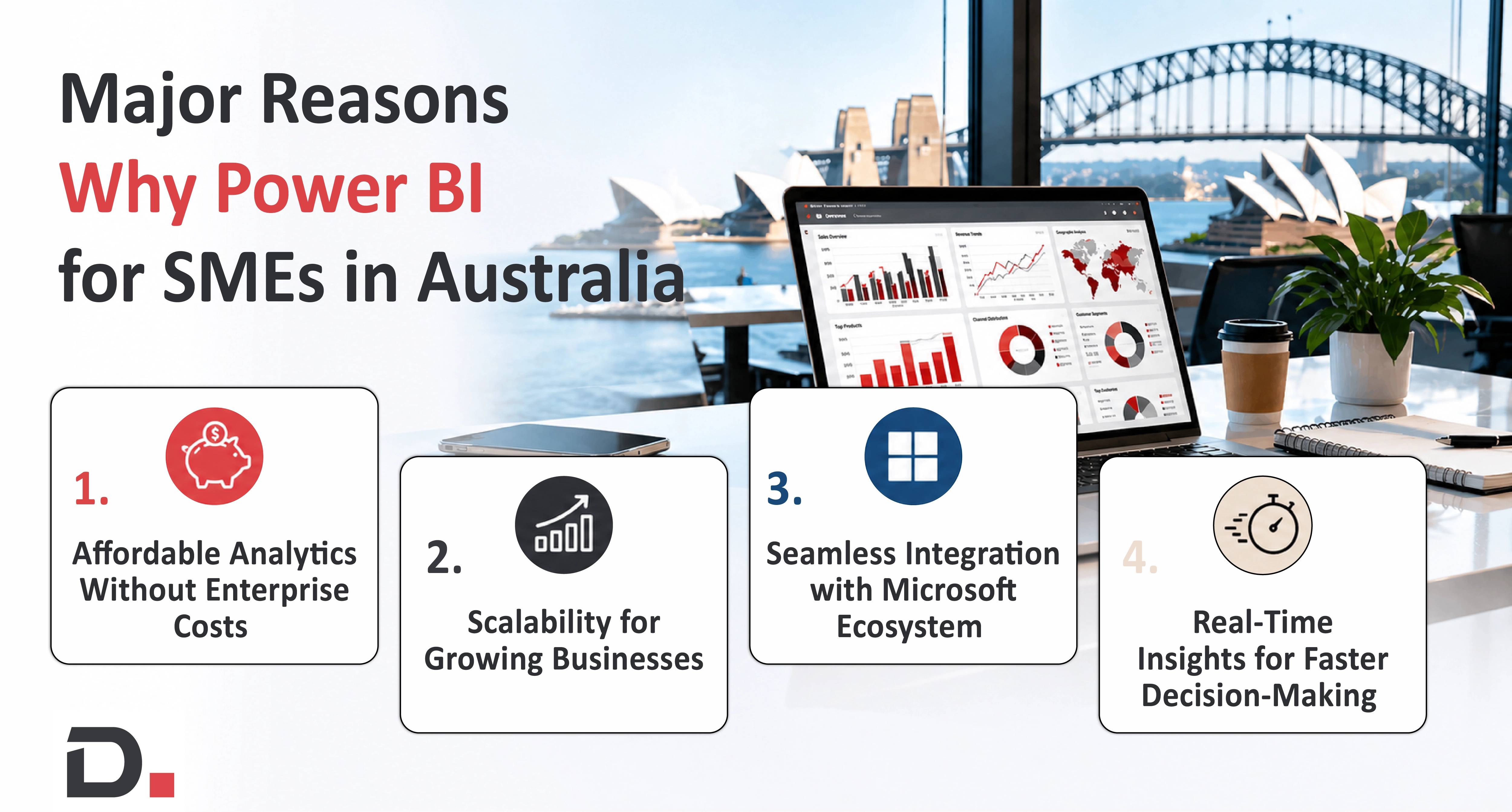
1. Affordable Analytics Without Enterprise Costs
The main benefit of Power BI for Australian SMEs is its affordable pricing structure. Power BI provides flexible pricing options which differ from conventional BI tools that need substantial initial costs.
Free version for individual use
Pro version
Premium Per User
This allows SMEs to start small and scale gradually.
More importantly, Power BI is considered affordable not because it is cheap but because it aligns cost with usage and business growth .
2. Scalability for Growing Businesses
SMEs don’t stay small forever. As businesses expand, their data grows exponentially.
Power BI supports:
Small teams with basic dashboards
Mid-sized companies with collaborative reporting
Large-scale analytics with enterprise capabilities
3. Seamless Integration with Microsoft Ecosystem
A good deal of Australian SMEs have developed an affinity to Microsoft tools, such as Excel, Teams and Dynamics 365.
Power BI also integrates seamlessly with:
- Microsoft 365
- Azure
- Dynamics 365
- Third-party applications
This reduces implementation complexity and maximizes existing investments .
4. Real-Time Insights for Faster Decision-Making
Traditional reporting often involves delays by the time reports are ready, the insights are outdated.
Power BI enables:
- Real-time dashboards
- Automated data refresh
- Instant performance tracking
Power BI Capabilities
- Uncover Insights with AI
- Bring all your data together
- Turn insights into impact
- Empower every data team
Power BI (Free)
It is a solution for companies that are starting with the whole analytics thing but they do not require advanced sharing or collaboration.
Major advantages:
- Connect to hundreds of data sources
- Build reports and dashboards
- Use Power Query for data transformation
- Publish reports to your personal workspace
- Export to Excel, CSV, or PDF
- Basic data refresh (limited)
- Limitations
The biggest limitation is sharing. Sharing dashboards or collaborating with individual users in your organization cannot be done without a paid license.
Power BI Use Cases Across Australian Industries
Power BI lets organisations across many industries, turn complicated business data into insights that are actually usable. It also boosts visibility more than people expect and then supports better decisions. Some Power BI usecases are:
Manufacturing In manufacturing, teams can keep an eye on production results, inventory positions, equipment utilization and operational KPIs in real time.
Wholesale and Distribution In wholesale and distribution industry, Power BI helps track stock movement, identify demand patterns, assess supplier performance and review order fulfilment measures all in one dashboard.
Retail and eCommerce For retail and eCommerce, teams check sales outcomes, figure out how customers buy, monitor inventory turnover and evaluate marketing campaign outcomes in a straightforward way.
Professional Services For professional services, you can measure project profitability, how resources are actually being used, billable hours and the broader state of business performance with more consistent reporting.
However, they cannot share the live dashboard with other departments unless they upgrade to Pro.
AI in Power BI: Transforming SME Decision-Making
The integration of Artificial Intelligence into Power Bi is the contributory magic for bringing advanced analytics to small businesses.
Key AI Capabilities:
- Natural Language Queries
- Automated Insights
- Predictive Analytics
- AI-Powered Visualizations
Power BI Innovations Shaping Australian Businesses in 2026
Following the some Power BI trends in 2026:
AI-Powered Insights Power BI Copilot helps users create insights, tight summaries and visualisations using plain natural language prompts which cuts down on the need for advanced technical skills.
Microsoft Fabric Integration Power BI now connects nicely with Microsoft Fabric so data integration, analytics, business intelligence and AI come together in one unified platform, instead of managing separate tools.
Real-Time Analytics Organisations follow key metrics through continuously refreshed dashboards, this supports quicker responses to shifting business conditions.
Self-Service Reporting Power BI lets business users build and adapt reports on their own, so less dependence on IT teams and decision making speeds-up.
Key differences table between Power BI (Free) and Power BI Pro
| Feature / Capability | Power BI (Free) | Power BI Pro |
| Intended for | Individual use | Team & organization use |
| Share dashboards/reports | Not allowed | Yes |
| View shared content | No | Yes |
| Collaboration in workspaces | No | Yes |
| Data refresh | Limited | More frequent |
| Storage | Personal workspace only | Shared & collaborative workspaces |
| Security (RLS) | Not supported | Supported |
| Publishing to apps | No | Yes |
| Licensing | Free | Paid per user |
Power BI Licensing for SMEs
Businesses comparing BI tools often look into the Power BI license cost Australia to plan budgets effectively. While exact pricing may vary depending on:
- Microsoft promotions
- Enterprise agreements
- Cloud subscriptions
- Local resellers
Power BI Pro requires organizations to budget for its monthly subscription fee which applies to each individual user. Companies who need accurate pricing information should visit Microsoft Australia official website and their authorized Australian partners to obtain current regional pricing details. The Pro subscription price difference from the Free plan becomes necessary because it provides essential tools for collaboration and sharing and governance and enterprise operation.
Proper Roadmap for Efficient Power BI Implementation
The maximum value for SMEs occurs when they implement these best practices:
1. Start Small and Scale
The process should begin with a pilot project which will then proceed to gradual expansion.
2. Define Clear KPIs
The business requires specific metrics which should be the main focus of their measurement efforts.
3. Invest in Training
The organization must provide training programs which will enable employees to operate dashboards.
4. Optimize Licensing
The organization must avoid purchasing excessive licenses while conducting license usage assessments on a regular basis.
5. Ensure Data Quality
The data requires cleaning and structuring work before it can proceed to the implementation phase.
The ROI of Power BI for SMEs
For SMEs, investing in analytics tools must translate into measurable outcomes.
Power BI delivers ROI in multiple ways through its main benefits:
The first benefit of Power BI reporting automation reduces reporting time requirements.
The second benefit of Power BI delivers real-time insights which allow decision makers to reach their decisions faster.
The third benefit of Power BI enables businesses to develop revenue opportunities through data-based techniques.
The fourth benefit of Power BI allows businesses to decrease operational expenses by discovering their inefficiencies.
Businesses can make confident decisions which lead to sustainable growth by using data instead of guesswork.
Why do Australian SMEs Choose Power BI?
A lot of Australian SMEs are adopting Power BI because of clearer visibility without paying for the cost and complexity of older analytics systems. And since it works well with Microsoft tools, has pricing that can actually scale as they grow, plus self-service reporting that doesn’t require much IT effort, it acts as a straightforward option for expanding teams.
Key factors due to which SMEs tend to Prefer Power BI are:
- Affordable, flexible licensing
- Interactive dashboards and reports that are easy to explore
- Live or near real time business insights
- Smooth integration with Microsoft 365 and Business Central
- Self-service analytics for everyday business users
- Secure, cloud-based reporting that is reliable
- Quicker decisions powered by the data they have
To sum up, Power BI lets Australian SMEs turn raw business information into useful findings so they can make smarter decisions and keep growth steady over time.
The Future of Power BI in Australia’s SME Landscape
The Australian SME sector will experience rapid Power BI adoption because of two main drivers which will boost demand for data-based decision-making together with organizations needing automated AI solutions and Microsoft Fabric ecosystem growth and businesses needing rapid access to information to stay competitive.
Power BI will gain greater strength through emerging AI technologies which will help SMEs:
Improve their ability to forecast upcoming trends
Create systems that automatically decide without human input
Achieve market parity with bigger business competitors.
Conclusion
Small and medium enterprises can achieve business success through budget-friendly analytical solutions. Power BI has completely changed how Australian SMEs use data to make their decisions. Its combination of affordability, scalability, and advanced analytics makes it one of the most accessible business intelligence tools available today.
Power BI functions as a reporting solution for Australian SMEs, yet it serves as a powerful strategic tool which enables organizations to realize their full data-based potential.
SMEs that choose to implement Power BI will gain a competitive advantage which enables them to develop innovative solutions and expand their business operations within the digital economy as data has become a crucial element for achieving business success.
Are you prepared to transform your information into practical operational insights?
Power BI enables organizations to enhance their operational processes which results in improved decision-making abilities.
Our experts are available for you to begin your analytics journey. Contact us!
FAQ
Is Power BI a better choice for small businesses?
For most small organisations yes, it is reliable and workable. Power BI has flexible licensing options so it fits companies of basically every size even the smaller ones that start with just a few users.
Can Power BI connect with Business Central?
Yes, it integrates smoothly with Dynamics 365 Business Central and it also works greatly with other Microsoft systems.
What’s the real difference between Power BI and Excel?
Excel is mainly a spreadsheet tool you use day to day. Power BI is meant for deeper reporting, visualisation and analytics.
Does Power BI have AI features too?
Yes, Power BI has AI features as well like Copilot and some other AI-driven operations such as natural language questions, automated insights and forecasting too.
How long does a Power BI setup take?
It depends, the timeline changes based on which data sources you use, what kinds of reports you’re after and also how complex the business side is.


Witness a scalable transformation
Experience real-time synchronisation and flexibility with a consistent view across your business.
Disclaimer– “All data and information provided on this blog is for informational purposes only. Dynamics Square / MPG Business Information Systems Pvt. Ltd. makes no representations as to accuracy, completeness, currentness, suitability, or validity of any information on this site and will not be liable for any errors, omissions, or delays in this information or any losses, injuries, or damages arising from its display or use.”


