

Table of Content
Running projects in Australia- industrial services, engineering, field operations, or professional services gets messy the moment you scale. Not because your team can’t deliver, but because delivery data, costs, and resource decisions live in different places.
That’s where Microsoft Dynamics 365 Business Central stands out. It connects project planning, resourcing, costing, and reporting in one system so ERP job costing becomes something you manage in real time, not reconcile after the job is done.
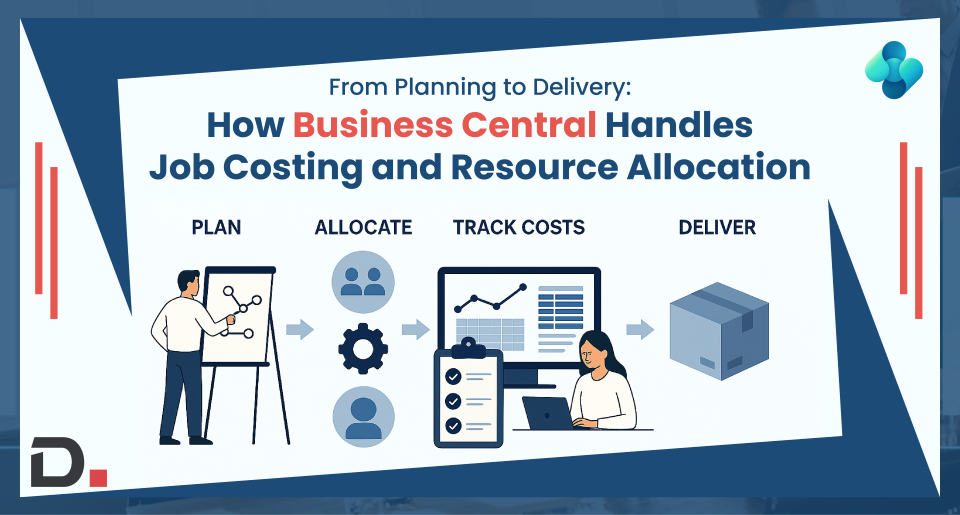
This guide walks through the full lifecycle: from planning and budgeting to delivery, cost control, WIP recognition, and project reporting, plus a quick comparison table you can use to evaluate whether your current setup is holding you back.
Why job costing and resource allocation break in growing project businesses
Most cost blowouts don’t come from one big mistake. They come from small daily gaps that compound:
- Budgets sit in spreadsheets with multiple versions and unclear ownership
- Labour and material costs appear late, so overruns are only visible after the fact
- Resource Allocation happens based on availability “assumptions,” not live capacity
- Billing gets delayed because time and costs aren’t cleanly tied to tasks and approvals
- Month-end profitability looks distorted because WIP isn’t tracked consistently
- Project Reporting becomes a manual exercise slow, inconsistent, and hard to trust
When those gaps exist, project teams end up firefighting. Finance ends up doing damage control. And leadership makes decisions with partial visibility.
The fix isn’t “more reporting.” The fix is a connected system where planning, delivery, costs, and financials stay aligned from day one.
What End-to-end project control looks like in Business Central
Think of it as a loop that runs throughout the job:
- Set up the job structure (phases, tasks, billing rules)
- Plan the budget (labour/resources, materials/items, subcontractors via Service items, overhead via G/L)
- Allocate resources against real capacity and timelines
- Capture actuals (time sheets, purchases, consumption) to keep job costing live
- Recognise WIP and use reporting to steer delivery and protect margin
The value is simple: you stop managing projects in fragments, and start managing them as one connected workflow.
Step 1: Plan the job properly with structure and Project Budgeting
A strong project starts with a structure the whole business can operate on, not just the delivery team.
In Business Central, you can break a project into tasks and stages that reflect how you actually deliver work (mobilisation, design, procurement, install, commissioning, warranty). That structure becomes the backbone for budgeting, costing, billing, and reporting.
Project Budgeting then becomes more than a forecast. It becomes your baseline for control:
- Budget by task or phase
- Separate cost types (labour, materials, subcontractors via Service items, equipment, overhead)
- Set expected timelines so budget burn can be tracked against progress
- Establish clean billing rules (fixed price, installments, milestones) before delivery starts
Outcome: everyone works from the same plan, and variance is visible early before it turns into margin loss.
Step 2: Resource Allocation that reflects real capacity -not best guesses
Resource issues don’t just create delays, they create cost blowouts.
When capacity isn’t visible, teams either overbook key people (causing bottlenecks) or underutilise expensive resources (wasting margin). Business Central supports capacity-based, manual resource scheduling, so you can plan work against availability and monitor utilisation.
A practical Resource Allocation approach looks like:
- Allocate resources by role/skill (PM, engineer, technician, specialist)
- Balance demand vs capacity to avoid “last-minute reshuffles” .
- Forecast the cost impact of resourcing decisions while the job is still flexible
- Reduce reliance on tribal knowledge by making availability visible
Outcome: resourcing becomes a lever for delivery confidence and profitability, not a constant firefight.
Step 3: Keep ERP job costing “always on” with real-time actuals
Job costing fails when actuals arrive late. Business Central keeps costing live by capturing actuals as the job runs, provided teams post time, purchases, and usage promptly:
- Time entry / timesheets record labour against the right job task
- Purchases and subcontractor costs (via Service items) can be recorded against the project
- Material usage is posted so consumption doesn’t disappear into inventory noise
- Actual costs roll up against the budget so you can see variance while work is happening
- This is where ERP job costing becomes operational, not accounting-only.
Instead of asking:
Are we profitable? (after month-end)
You start asking:
What’s driving variance this week, and what do we change now?
| Area | Disconnected tools (spreadsheets + accounting + PM tool) | Business Central (connected ERP) |
| Project Budgeting | Multiple versions, manual consolidation | Single budget baseline tied to tasks and actuals |
| ERP job costing | Costs reconciled after the fact | Costs tracked as work happens (time, purchases, usage) |
| Resource Allocation | Capacity guessed / static calendars | Plan resourcing against real availability and timelines |
| WIP Recognition | Often delayed or inconsistent | Structured WIP to reflect mid-project financial position |
| Project Reporting | Manual reporting cycles | Consistent reporting from one data source+ + Power BI Project apps |
| Profit control | Margin known too late to react | Early visibility into budget burn and cost drivers |
| Billing accuracy | Missed billables + disputes | Cleaner audit trail from time/cost to invoicing |
Step 4: WIP Recognition so profitability stays real during delivery
Project businesses often face a timing problem:
- Costs land today
- Billing lands later
- Financials in the middle can look misleading
That’s why WIP recognition matters. It helps reflect the financial position of work in progress, so profitability isn’t distorted mid-project.
Business Central supports multiple WIP methods (Cost Value, Cost of Sales, Sales Value, Percentage of Completion, Completed Contract) so you can choose the one that fits your accounting policy.
When WIP is handled properly:
- Finance gets a truer picture of performance during delivery
- Leadership decisions improve because the numbers represent reality
- Project and finance teams stay aligned, fewer “explain the numbers” meetings
- You reduce the risk of unpleasant surprises at the end of the job
Outcome: your reporting supports decision-making during delivery, not just after delivery.
Step 5: Project Reporting that helps you act, not just report
The best project reporting doesn’t describe the past, it flags risk early.
With consistent project data, reporting becomes useful across the business:
- Project Managers track budget burn, task variance, and cost drivers
- Operations tracks utilisation, demand vs capacity, and resourcing risk
- Finance tracks profitability, WIP position, and billing readiness
And because Business Central fits into the Microsoft ecosystem many Australian businesses already use, teams can stay productive without constantly jumping between tools for updates and reporting.
Outcome: reporting becomes part of how you run projects- weekly, daily, and even in real time not a monthly admin burden.
What this looks like in real life
Imagine a fixed-price project mid-delivery:
- Labour starts trending above budget on a critical phase
- Resource availability shows a key specialist is overbooked next fortnight
- Subcontractor costs land earlier than expected
- WIP gives a clearer mid-project view of performance
- The PM adjusts resourcing and billing timing while the job is still recoverable
That’s the difference between reacting to overruns and managing them.
When Business Central is the right fit for project-based businesses in Australia
Business Central is a strong fit if you’re dealing with:
- Multiple concurrent projects sharing resources .
- Tight margins where small overruns become big losses .
- Mixed cost types (labour, materials, subcontractors, equipment) .
- A need for consistent Project Budgeting, WIP recognition, and profitability control .
- Reporting that currently depends on spreadsheets and manual consolidation .
- Increasing compliance and governance expectations as you scale .
If you recognise three or more of these, you’ll usually see measurable value from moving to a connected ERP model like Business Central
Book a Business Central roadmap call
If your project control relies on spreadsheets, manual reporting, or disconnected tools, you’re not alone but you don’t have to stay there.
Book a Business Central roadmap call with Dynamics Square. We’ll map your project lifecycle (planning → resourcing → costing → WIP → reporting) and show what to standardise, what to extend, and how to improve control without overcomplicating delivery.
Ready to take control of your projects?
Talk to Dynamics Square about implementing Business Central for project-based businesses in Australia.


Searching for a Localised Business Central Implementation Partner?
Stop searching for a Business Central Implementation Partner! Our Australia-backed committed partner who understands your business is here to make your implementation seamless and efficient.
Disclaimer– “All data and information provided on this blog is for informational purposes only. Dynamics Square / MPG Business Information Systems Pvt. Ltd. makes no representations as to accuracy, completeness, currentness, suitability, or validity of any information on this site and will not be liable for any errors, omissions, or delays in this information or any losses, injuries, or damages arising from its display or use.”


